

FlyColor
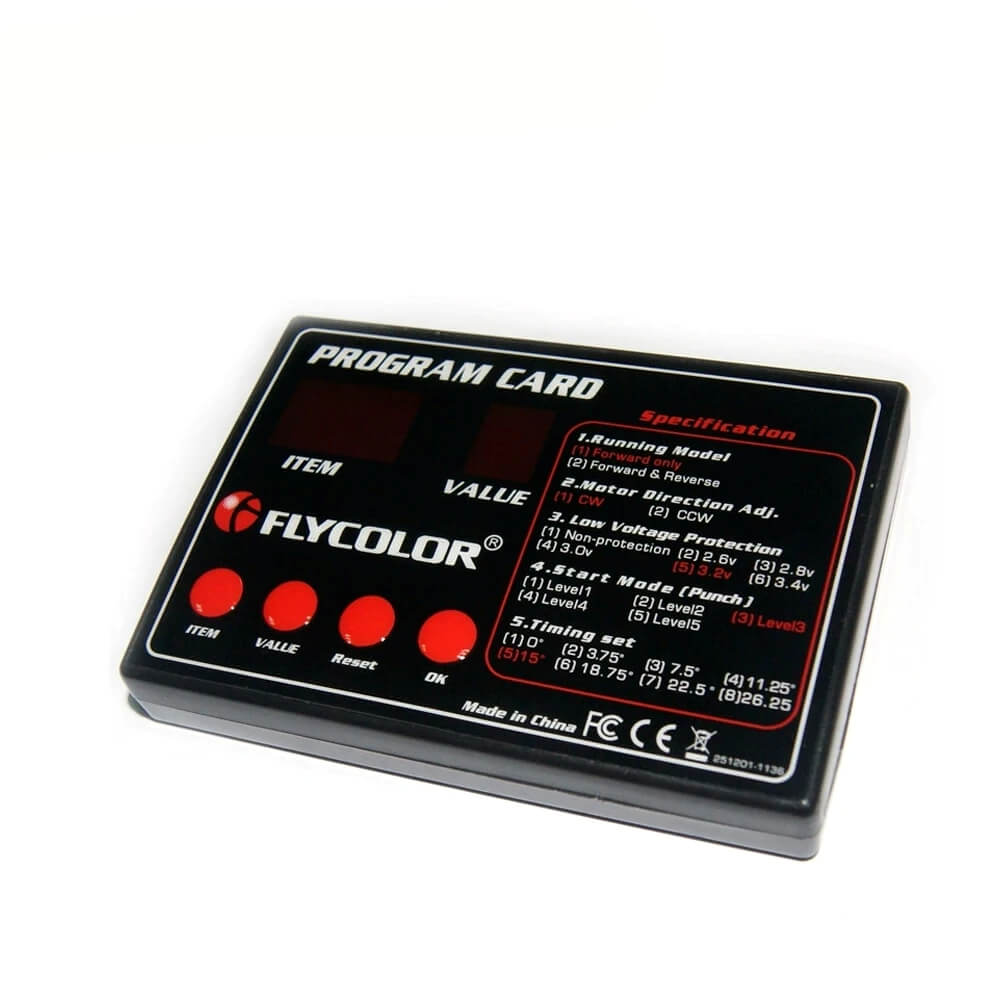
FLYCOLOR Brushless ESC Programming Card for 30A–120A Speed Controllers
FLYCOLOR Brushless ESC Programming Card for 30A–120A Speed Controllers
Couldn't load pickup availability
- FREE Shipping for Orders over $29!
- Dispatch Within 1 Business Day!
- 30-Day Change of Mind Returns!
Quickly and conveniently adjust supported settings on compatible FLYCOLOR brushless electronic speed controllers with this compact ESC programming box.
Designed for selected 30A, 50A, 70A, 90A and 120A FLYCOLOR ESCs, it provides a simpler way to configure settings such as battery low-voltage protection without relying on transmitter-based programming sequences.
Features
- Designed for programming compatible FLYCOLOR brushless ESCs
- Suitable for selected 30A, 50A, 70A, 90A and 120A speed controllers
- Allows supported ESC settings to be adjusted conveniently
- Supports battery low-voltage protection configuration
- Compact and portable design
- Simple connection and operation
Specifications
- Brand: FLYCOLOR
- Product Type: ESC programming box/card
- Input Voltage: 4.8V–6.0V
- Dimensions: Approximately 95 × 66 × 16 mm
- Compatible ESC Ratings: Selected 30A, 50A, 70A, 90A and 120A models
Package Includes
- 1 × FLYCOLOR ESC Programming box
Important Compatibility Information
- This programming box is not universally compatible with all brushless ESCs.
- Please confirm that your exact FLYCOLOR ESC model supports this programming box before purchasing.
- ESC functions and available programmable settings may vary depending on the connected speed controller.
- The ESC, motor, battery and connecting accessories are not included unless specifically shown or stated.
- Basic RC electronics knowledge is recommended.
Shipping & Returns
Shipping & Returns
We proudly deliver across Australia and New Zealand, bringing your favourite products right to your doorstep.
Shipping Costs
We offer free standard shipping on eligible orders to Australia and New Zealand.
Shipping rates and free-shipping thresholds may vary by destination and order value. The exact shipping cost will be calculated and clearly displayed at checkout before payment.
Order Processing
We aim to process in-stock orders within one business day.
Processing may take slightly longer during public holidays, peak periods or when additional order checks are required. We will contact you by email if there is a significant delay affecting your order.
Delivery and Tracking
Available shipping options and estimated delivery timeframes will be displayed at checkout after you enter your delivery address.
Once your order has been dispatched, you will receive a confirmation email containing tracking information. Tracking can sometimes take a few days to update after dispatch.
Orders containing multiple products may arrive in separate packages.
Please contact us if your tracking has not updated after eight business days, and our support team will assist you.
Returns and Refunds
We accept eligible change-of-mind returns requested within 30 days of delivery, subject to the conditions in our Returns & Refunds Policy.
Products returned due to a change of mind must be unused, unassembled, unmodified and returned with all original packaging, manuals, accessories and components. Customers are responsible for change-of-mind return postage.
Faulty, damaged or incorrectly supplied products are handled separately in accordance with our Returns & Refunds Policy and the consumer law applicable to the purchase, including the Australian Consumer Law and New Zealand Consumer Guarantees Act.
Please contact us before returning any product. Once a return is approved, we will provide the appropriate return address and instructions.
For complete eligibility requirements, exclusions, return costs, refund timeframes and faulty-product assistance, please read our Returns & Refunds Policy.
Contact Us
For shipping, delivery or return enquiries:
Email: support@thejoybox.com.au
Online: Through our Contact Us form
Our customer support team responds seven days a week and aims to reply within 24 hours.
Care Instructions
Care Instructions
Battery Maintenance Guide (If applicable)
- Charge the battery fully before first use, after any use, before storage or use after storage.
- Disconnect the battery from product when not in use. Leaving the battery connected to the product when not in use, can cause damage to the battery due to gradual discharging.
- Do not run RC products supplied with LiPo or Li-Ion batteries until the battery power becomes very low or fully discharged. This will cause permanent damage to the battery.
- Allow for battery to cool down prior to charging again. This will help long battery life.
Share